
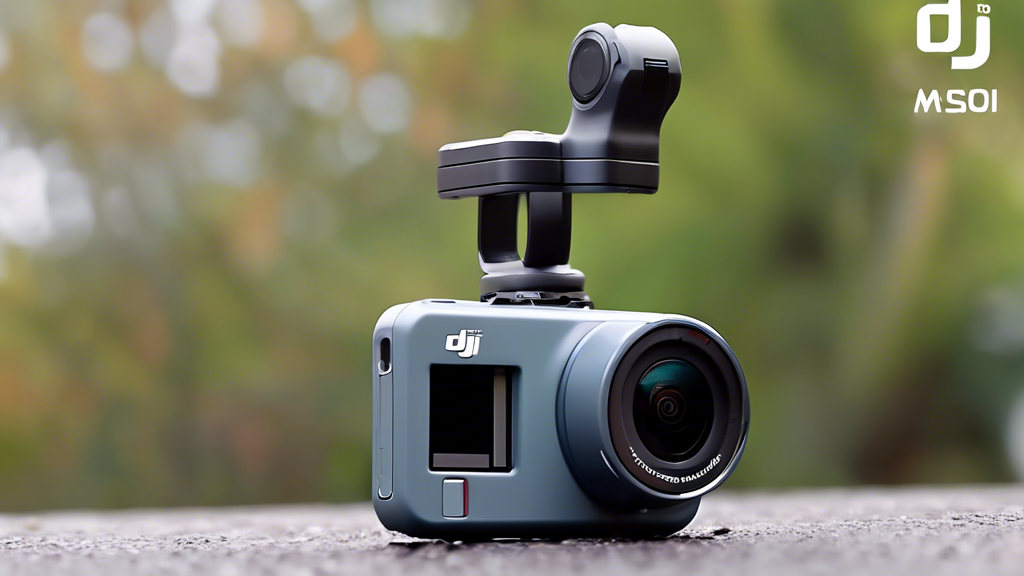
From Shaky Clips to Cinematic Stories: Mastering the Modern Action Camera
You crest the mountain bike trail, heart pounding, the world a blur of color and motion. Later, you review the footage—it’s a jittery, chaotic mess that fails to capture the thrill. This gap between lived experience and forgettable video is the frustration of every aspiring adventurer-creator. The bridge to breathtaking content is built on technology and technique.
Mastering a tool like the DJI Osmo Action 4 is the key to unlocking that potential. It transforms you from a passive recorder to an intentional filmmaker. Now is the moment to elevate your craft, as you can discover the advanced features and Cyber Monday savings on the DJI Osmo Action 4 Camera and build a foundation for visual excellence.
The Engineering Edge: Hardware Built for Dominance
Superior footage starts with superior engineering. The Osmo Action 4’s design isn’t just about specs; it’s about solving real-world problems for creators. Each component is a deliberate choice to enable your best work.
The Imaging Core: Sensor and Color Science
At its heart lies a 1/1.3-inch sensor. This larger sensor is your ally in low light, capturing more detail with less noise when the sun dips or you move into shadows. It provides a wider dynamic range, preserving highlights in snowy scenes and details in forest shadows simultaneously. Paired with 4K/120fps recording, you have the raw material for buttery-smooth slow motion. The inclusion of 10-bit D-Log M color profile is a professional-grade feature, capturing a wider gamut of color and light data for powerful, nuanced color grading in post-production.
Stabilization and Durability: The Invisible Shield
RockSteady 3.0+ isn’t just a feature; it’s a revelation. This hyper-smooth electronic image stabilization (EIS) actively counters shakes and jolts, delivering gimbal-like steadiness from a compact camera. Your trail runs, ski descents, and bumpy road trips become watchable, cinematic journeys. This confidence is backed by ruggedness: 18-meter waterproofing without a separate housing, reliable operation in extreme temperatures, and a scratch-resistant lens protector ensure the camera survives where your adventures happen.
Form Factor & Usability: Designed for the Moment
| Component | Key Characteristics |
|---|---|
| Front Color Screen | Provides a live view for perfect self-framing. This is non-negotiable for vloggers and solo creators who need to confirm they’re in the shot. |
| Magnetic Quick-Release | Enables one-second swaps between mounts. The connection isn’t just fast; it’s incredibly secure, locking the camera down for high-impact sports. |
| Voice Control & Touch Interface | Allows hands-free command for starting/stopping recording. When combined with the responsive rear touchscreen, it creates an intuitive control flow in any situation. |
Commanding the System: Control Variables for Pro Results
Think of the Osmo Action 4 not as a point-and-shoot device, but as a dynamic filmmaking system. Mastering these control variables is how you achieve consistent, professional quality.
Exposure and Color: Capturing the True Scene
Your Target: Balanced exposure with rich detail in both shadows and highlights.
The Method: This is where D-Log M and HorizonLock prove indispensable. Shoot in D-Log M to capture a “flat” color profile with maximum data. This gives you immense flexibility to color grade and correct exposure in editing software without degrading the image. Use HorizonLock to ensure your horizon stays level even if the camera rotates up to 360 degrees—a lifesaver for mounting on bikes, boats, or anything that leans.
Audio Fidelity: Beyond the Wind Roar
Your Target: Crisp, clear dialogue and ambient sound, minus destructive wind noise.
The Method: Leverage the three-microphone array and DJI’s intelligent algorithms. The system automatically detects and suppresses wind noise. For interviews or critical audio, use the wind noise reduction setting and consider the external mic adapter for a lavalier or shotgun microphone.
Power and Endurance: The Shot is Never Missed
Your Target: All-day power for extended adventures.
The Method: The long-life battery provides a robust baseline. For marathon sessions, manage your settings: lower screen brightness, use standard stabilization (not RockSteady+) when acceptable, and carry DJI’s quick-charge battery case. Pre-charge multiple batteries the night before a big day.
The Art of the Shot: Advanced Practices for Storytellers
Now we shift from technical control to creative application. This is where you optimize the tool to serve your vision.
Preparation: Building Your Accessory Ecosystem
The right mount defines your perspective. A helmet mount offers a first-person view, a chest mount provides a stable, immersive angle, and an extended handle (selfie stick) allows for dynamic orbiting shots. Essential add-ons include Neutral Density (ND) filters. These reduce light entering the lens, allowing you to use slower shutter speeds to create beautiful motion blur in bright conditions—a key cinematic technique for flowing water or speeding landscapes.
Ongoing Inputs: The Power of Post-Production
Your work isn’t done when you stop recording. Import your D-Log M footage into editing software like DaVinci Resolve or Adobe Premiere. Apply a technical LUT (Look-Up Table) to normalize the colors, then grade to your artistic style—this is the professional workflow the Action 4 enables. For quick social shares, the DJI Mimo app offers powerful, automated editing tools to create polished stories directly on your phone.
Selection and Strategy: Intelligent Shooting Modes
Don’t just record—create with intent. Use TimeShift for mesmerizing sped-up sequences of changing skies or city traffic. Employ Hyperlapse for smooth, moving time-lapses. Slow Motion (120fps) is perfect for emphasizing a trick’s peak action or a water splash. Pre-configure your two QuickSwitch buttons on the camera’s side. I set mine to toggle between 4K/60fps Normal and 4K/120fps Slow-Mo, so I’m always one click away from the right mode.
Proactive Defense: Avoiding the Common Pitfalls
A professional anticipates problems. Adopt a proactive stance to ensure your gear performs when it matters most.
Prevention: Routine Maintenance and Setup
Before every major outing, conduct a systems check. Clean the lens and front screen with a microfiber cloth. Verify your firmware is updated for the latest features and fixes. Physically check and tighten all mount connections. A loose mount is the fastest way to lose a camera. Store the camera with a desiccant silica gel pack in its case to ward off moisture.
Intervention: A Tiered Troubleshooting Guide
Issue: Fogging inside the lens or housing.
Solution: Use anti-fog inserts designed for action cameras. Ensure the camera and its environment are at similar temperatures before sealing it in a housing, and never open the battery door in a humid environment.
Issue: Overheating warning during extended recording in hot conditions.
Solution: This is a safeguard. Step one: reduce the recording resolution or frame rate (e.g., from 4K/120fps to 4K/60fps). Step two: remove the camera from direct sunlight. Step three: if using a waterproof case, remove it to improve airflow around the camera body.
Your Filmmaker’s Calendar: A Year-Round Roadmap
| Season / Phase | Primary Tasks | What to Focus On |
|---|---|---|
| Winter (Indoor/Cold) | Test low-light performance indoors. Edit and grade footage from the past year. | Mastering color grading with D-Log M footage in your editing software. Experiment with indoor hyperlapses. |
| Spring | Adventure preparation. Configure and test all mounting systems. | Dialing in HorizonLock settings for biking, hiking, or other dynamic movements. Testing audio clarity in windy conditions. |
| Summer (Peak Season) | Daily recording and battery management. Using QuickSwitch for rapid mode changes. | Capturing the action. Efficient file management and in-field review. Utilizing ND filters for cinematic motion blur. |
| Fall & Cyber Monday | Review the year’s best footage, complete editing projects. Evaluate gear needs. | The strategic opportunity: to discover the advanced features and Cyber Monday savings on the DJI Osmo Action 4 Camera, upgrading your kit or entering the ecosystem for the season ahead. |
Elevate Every Adventure into a Story
The journey with a tool like the Osmo Action 4 is a progression from simple recording to intentional filmmaking. It begins with understanding its robust, purpose-built hardware. It deepens as you learn to command its exposure, audio, and power systems like a pro. It culminates in the creative application of its modes and accessories to craft compelling visual narratives.
The true transformation isn’t just in your footage—it’s in your perspective. You start seeing the world in frames, in sequences, in stories waiting to be told. The reward is a personal library of stunning, stable memories that truly reflect the exhilaration of your experiences. This mastery is within reach. There is no better time to begin than now, as you discover the advanced features and Cyber Monday savings on the DJI Osmo Action 4 Camera and equip yourself to turn every adventure into a story worth telling for years to come.
