
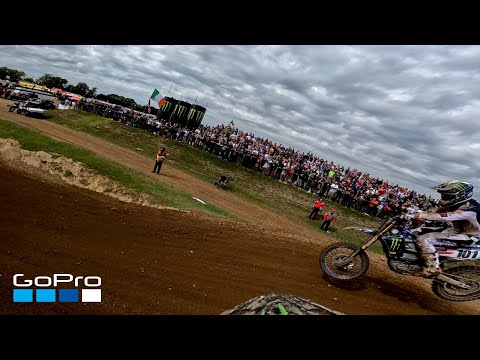
Motocross is one of the most demanding environments you can put a helmet camera through — constant vibration, dirt, mud, crashes, and extreme g-forces through jumps and corners. This guide covers the best cameras for motocross use specifically, with settings that work for the unique demands of off-road racing and recreational riding.
What Makes Motocross Different from Road Riding
Motocross footage has different requirements to motorway riding footage. The challenges are:
- High-frequency vibration — 2-stroke and 4-stroke mx bikes vibrate differently from road bikes. Cheaper cameras struggle to compensate.
- Extreme exposure changes — jumps into bright sky, landing in tree shadows, dust clouds. Dynamic range is critical.
- Impact protection — crashes are more common. Cameras need to survive falls.
- Roost and mud — debris thrown by other riders hits the camera directly.
- Compact size — a large camera block on a motocross helmet can catch the ground or handlebars in a crash.
Best Cameras for Motocross Riders
1. GoPro Hero 13 Black — Best Overall for MX
GoPro has dominated motocross and off-road filming for a reason: HyperSmooth 6.0 handles the violent vibration patterns of 2-stroke MX bikes better than any competitor. The rugged housing is genuinely protective (survives a 6-foot drop onto concrete per GoPro’s testing). At 5.3K/60fps, you have the resolution to crop to the exact angle you want in editing.
Best settings for motocross:
- 2.7K / 120fps (for slow-motion jump and corner analysis)
- Wide lens (captures the full bike and body position)
- HyperSmooth Boost
- Protune ON, Shutter 1/240s, ISO max 1600
Price: ~$399
2. DJI Osmo Action 5 Pro — Best for Long Moto Days
A full day of riding in the desert or at an enduro event can run 6+ hours. The Osmo Action 5 Pro’s 160-minute battery life at 4K/30fps — significantly better than GoPro — means fewer stops for battery changes during riding. The 1/1.3-inch sensor handles the harsh contrast of bright desert and dark tree canopy better than smaller-sensor cameras.
Best settings for motocross:
- 4K / 60fps (standard) or 2.7K / 120fps (slow motion)
- RockSteady 4.0 ON
- Horizon Steady ON
- Wide FOV
Price: ~$269
3. Insta360 GO 3S — Best Lightweight Option
At just 35g, the GO 3S is the lightest helmet camera option for motocross. When you’re already wearing a full-face helmet, goggles, neck brace, and chest protector, minimising camera weight matters. The magnetic mounting system makes it easy to move between your helmet, chest protector, and handlebars.
Trade-offs: 2.7K/30fps maximum resolution (not competitive with GoPro/DJI), smaller sensor means weaker low-light performance. But for riders who do social content rather than professional production, the weight and ease-of-use advantages are compelling.
Price: ~$299
Helmet Camera Mounting for Motocross
Chin Mount (Best Choice)
The chin mount is the safest and most stable option for motocross because the chin bar absorbs vibration. In a crash, the camera is more protected than a top mount. Peak Design Sports Chin Mount and GoPro’s own Helmet Chin Mount are both used by professional MX riders.
Side Mount (Avoid)
Side mounts catch air and debris, and in a crash can catch the ground and wrench the helmet. Not recommended for motocross.
Top Mount
Used by some GoPro-sponsored riders for its elevated perspective. More vulnerable in crashes. If you use a top mount, use a breakaway adhesive mount that releases on impact rather than a rigid mount that transfers crash forces to the helmet.
Camera Settings for Jump Footage
Capturing jumps in slow motion is one of the highest-value shots in motocross content. The key settings:
- Frame rate: 120fps minimum, 240fps if your camera supports it at acceptable resolution
- GoPro Hero 13: 2.7K/240fps or 4K/120fps
- DJI Osmo Action 5 Pro: 4K/120fps
- Shutter speed: Double the frame rate (240fps → 1/480s)
- This makes jump sequences look professional even from a basic chin mount setup
Protecting Your Camera from Roost and Mud
Debris from other riders’ tyres hits the camera at 50+ mph. Solutions:
- UV filter over the lens protects the glass and is easy to replace (~$8) vs. a cracked lens element
- Protective housing for GoPro adds extra protection but note it slightly reduces image quality
- Post-ride cleaning: Use a blower brush first to remove grit before wiping the lens with a cloth — wiping dry grit scratches the coating
Use our Camera Recommender to get a specific camera recommendation matched to your motocross or off-road riding style and budget.
Frequently Asked Questions
Can a GoPro Hero 13 survive a motocross crash?
GoPro claims the Hero 13 can survive drops onto concrete from 6 feet. In practice, riders report it survives most casual crashes intact. Hard impacts directly onto the camera can crack the housing or lens. For serious racing, a protective case or buying a second camera as backup is worth considering.
What’s better for motocross — 60fps or 120fps?
Record at 120fps if you want the option of slow-motion playback. Standard 60fps footage looks smoother than 30fps at the speeds involved in motocross. Most experienced MX content creators record everything at the highest frame rate available because you can always speed up 120fps to look like 60fps, but you can’t add frames you didn’t capture.
Official resources: GoPro Hero 13 Black official page | Full GoPro camera range.
