GoPro vs iPhone for Motorcycle Filming: Which Camera Actually Wins?

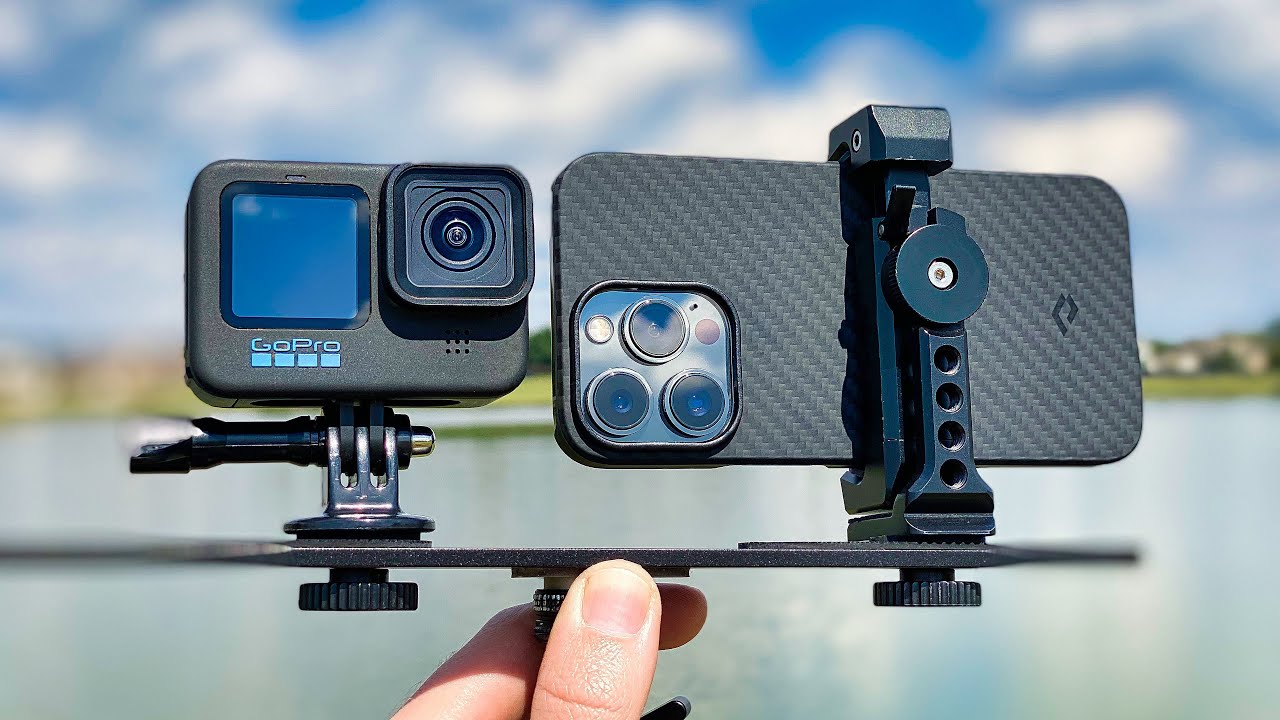
GoPro HERO 10 vs iPhone 13 Pro!

The honest answer depends entirely on what you are trying to do. For helmet mounting during a ride, the GoPro wins clearly. For everything else, the gap is much smaller than GoPro’s marketing suggests. Here’s how the two compare in real motorcycle conditions.

The Case for Using Your iPhone

Modern flagship phones shoot genuinely impressive video. The iPhone 15 Pro shoots 4K120 with Apple’s Log video format. In good lighting conditions, computational photography in a modern phone frequently beats a GoPro on pure image quality metrics. For filming your bike at a photo stop or a short talking-head piece to camera, your phone is an excellent tool you already have with you.

The Case Against Your iPhone on a Motorcycle

Vibration damage

Apple issued a support document in 2022 specifically warning against mounting iPhones to motorcycle handlebars due to engine vibration causing optical image stabilization and autofocus damage. The same risk applies to helmet mounting. GoPro cameras are built for this environment — iPhones are not.

Size and weight

A modern iPhone is approximately 160mm x 78mm x 8mm and weighs around 240g — heavier than a GoPro Hero 13 Black at 154g. On a chin or top mount, that extra weight and larger surface area create aerodynamic drag and affect helmet balance at speed.

Heat and battery

iPhones throttle performance when hot. A phone recording video in direct sunlight during a summer ride while also running navigation will frequently hit thermal limits and stop recording. GoPros are designed to record continuously in outdoor conditions.

Dedicated recording vs multitasking

Using your phone as a helmet camera means it is unavailable for navigation, music, and communication for the entire ride. A separate GoPro leaves your phone free for everything else.

Side-by-Side Comparison

Test GoPro Hero 13 Black iPhone 15 Pro
Stabilization at 70mph helmet mount Excellent — HyperSmooth 6.0 Good but not designed for this
Wind noise at motorway speeds Poor (both cameras suffer equally) Poor
Image quality in bright sunlight Very good Excellent
Image quality at dusk Good Better (larger sensor, Night mode)
Battery continuous recording ~75 min (replaceable) ~90 min (heats up, non-replaceable)
Waterproofing in rain 33 ft / 10m — no housing needed IP68 — fine in light rain
Helmet mountability Excellent — designed for it Poor — too large, no purpose-built mount
Vibration resistance Built for it Risk of hardware damage (Apple advisory)

The Verdict

For helmet-mounted riding footage: GoPro wins on practicality, safety, and purpose-fit design. For filming your bike parked or during breaks: your iPhone is perfectly fine and already in your pocket. The two tools complement each other rather than compete.

For the best GoPro to pair with your iPhone workflow, see our GoPro for motorcycle riders guide, or our full best helmet cameras guide to compare GoPro against DJI and Insta360.

Frequently Asked Questions

Can I mount my iPhone to my motorcycle helmet?

Technically yes, but it is not recommended. The size and weight create aerodynamic drag, the vibration creates hardware risk, and using your phone for recording means no navigation for the ride.

Is GoPro video quality better than iPhone?

In most controlled conditions, no — modern iPhones have excellent cameras. In motorcycle-specific conditions (vibration, airflow, continuous recording), GoPro is the more reliable and purpose-appropriate tool.

What does Apple say about motorcycle vibration and iPhones?

Apple published a support document warning that high-amplitude vibrations from high-power motorcycle engines can damage the iPhone camera system. They recommend against mounting iPhones directly to motorcycle handlebars or high-vibration surfaces.

Reviewed by the Digital Helmet Cameras Editorial Team. Comparison based on published GoPro and iPhone camera specifications. Prices and availability change; check current listings.

Official resources: GoPro Hero 13 Black specifications | iPhone 16 Pro camera specifications.

Best Slow-Motion Settings for Motorcycle Helmet Cameras (120fps & 240fps Guide)

GoPro: Top 10 Slow Motion Action

Slow motion footage from a helmet camera is one of the most effective tools for creating compelling motorcycle content — and for analysing your own riding technique. But getting it right requires specific settings that most riders don’t configure correctly. This guide covers the exact slow-motion settings for GoPro Hero 13, DJI Osmo Action 5 Pro, and Insta360 cameras, plus when to use each mode for the best results.

How Slow Motion Works: The Basics

Slow motion video is simply footage recorded at a higher frame rate than it’s played back. Standard video plays at 24 or 30fps. If you record at 120fps and play back at 30fps, the footage plays at 1/4 speed — four times slower than real time.

Record at Play back at Slow-motion factor Looks like
60fps 30fps 2x slower Subtle — smooth movement
120fps 30fps 4x slower Clear slow-motion effect
240fps 30fps 8x slower Very dramatic slow motion
240fps 24fps 10x slower Cinema slow motion

Best Slow-Motion Settings by Camera

GoPro Hero 13 Black

The Hero 13 is the most capable action camera for slow motion in its price range:

  • 4K / 120fps — Best quality slow motion. 4x slow at full HD playback. Use this for: corner sequences, jump footage, arrival/departure shots at speed.
  • 2.7K / 240fps — 8x slow motion with excellent quality. Use this for: water splashes, tyre roost, crash analysis, jump apexes in motocross.
  • 1080p / 240fps — 8x slow motion. Lower resolution but useful for long takes where storage matters.

Critical shutter speed setting: At 120fps, set shutter to 1/240s. At 240fps, set shutter to 1/480s. This follows the “180° shutter rule” — shutter speed double the frame rate — and creates natural motion blur that makes slow motion look cinematic rather than stiff.

Stabilization at high frame rates: HyperSmooth Boost is not available at 4K/120fps on the Hero 13 — use Standard mode. The difference is minimal at the speeds involved in slow-motion sequences.

DJI Osmo Action 5 Pro

  • 4K / 120fps — RockSteady 3.0 applies at this mode. Very smooth 4x slow motion suitable for cinematic sequences.
  • 2.7K / 120fps — More stable than 4K at the same frame rate due to slightly more crop tolerance.
  • 1080p / 240fps — 8x slow motion. Adequate for action sequences where full resolution isn’t needed.

Note: The Action 5 Pro does not offer 240fps at 4K. For maximum slow motion quality, use 2.7K or 1080p at 240fps, or 4K at 120fps for the best balance.

Insta360 X5

The X5 handles slow motion differently because of its 360° format:

  • 5.7K 360° / 30fps normal speed — then apply FlowState stabilization and reframe in the app.
  • 4K Single Lens / 100fps — Approximately 3x slow motion. Limited compared to GoPro/DJI for slow motion but the reframing advantage compensates.

For slow-motion motorcycle content with the X5, plan to reframe in the Insta360 Studio app: choose your angle, apply FlowState, then export. The result looks like a tracking shot that follows the action — which is more professional-looking than a fixed-angle slow-motion clip.

Top 8 Motorcycle Slow-Motion Shots Worth Capturing

1. Corner Entry and Exit

At 120fps, the moment of turn-in and lean becomes visually dramatic. Position your chin mount camera and review the footage to see your own body position and technique. For content, corner sequences at 4x slow are universally engaging.

2. Tyre Roost and Gravel Spray

The debris thrown by tyres is invisible in real time — at 240fps it becomes a shower of individual rocks and dust. Best captured from a third-party camera position, not helmet mount.

3. Jump Apex

The split-second when a motorcycle is fully airborne at the top of a jump is peak motocross content. 240fps captures the full arc and landing with enough detail to see suspension compression.

4. Water Splash / River Crossing

Adventure riding through water features is iconic. At 120–240fps, water spray creates dramatic visual patterns. The Osmo Action 5 Pro and GoPro Hero 13 are both fully waterproof — no additional housing needed.

5. Gear Change Sequence

A close-up mount on the gear lever at 240fps captures the mechanical precision of a racing gear change. Difficult to set up but a uniquely detailed shot that enthusiast audiences appreciate.

6. Arrival at a Layby or Summit

Slowing down from cruising speed to a stop at a scenic location — at 120fps this becomes a graceful arrival shot. Pair with wide FOV to include landscape context.

7. Gravel Road Spray

On unpaved roads, the rooster tail of gravel and dust thrown up at speed becomes cinematic at 120fps. Best captured by a second rider following at a safe distance.

8. Low-Sun Riding

Early morning or late evening light creates dramatic lens flare and shadow patterns at regular speed. In slow motion at 120fps, light shifts become visible movement — the landscape changes as you move through it.

Editing Slow-Motion Footage

Key editing principles for slow-motion motorcycle clips:

  • Don’t over-use it — slow motion is most effective as punctuation. Two or three slow-motion moments in a 3–5 minute video is ideal. Full-length slow-motion rides become fatiguing to watch.
  • Match music to playback speed — slow-motion sequences need slower, more dramatic music. Beat-sync slow-motion to a music breakdown is a proven formula.
  • Cut before the interesting moment, not at it — start your slow-motion clip slightly before the peak action. The lead-in makes the action hit harder.
  • DaVinci Resolve’s Speed Ramp — ramp from normal speed into slow motion and back out. This transition style is used in professional automotive and motorcycle content.

For personalized settings recommendations for your specific camera and riding conditions, use our Footage Settings Optimizer tool.

Frequently Asked Questions

Why does my slow-motion footage look choppy?

Most likely cause: the footage was recorded at 120fps but not interpreted correctly in your editing software. Import the clip and change the playback speed to 25% (for 120fps played at 30fps) or confirm your NLE has auto-detected the high frame rate. If using GoPro Quik, the slow motion is applied automatically.

Does slow motion use more battery and storage?

Yes — higher frame rates increase both data rate and processor load. At 4K/120fps on the GoPro Hero 13, battery life drops to approximately 50 minutes vs. 90 minutes at 4K/60fps. Storage: 4K/120fps uses approximately 8–9 GB per hour. Use a 128GB card minimum for extended slow-motion sessions.

What’s the difference between 120fps and 120p on camera menus?

They mean the same thing. Some cameras use “fps” (frames per second) and others use “p” (progressive scan) to describe frame rate. 120fps = 120p = the same 120 frames per second recording mode.

Official resources: GoPro camera specifications | DJI Osmo Action 4 | Insta360 Ace Pro 2.

How to Film Motocross: Camera Settings, Techniques & Best Angles

GoPro: Justin Barcia - 450 Moto 1 - 2022 Lucas Oil Pro Motocross Championship Unadilla MX

Filming motocross races — whether your own performance or someone else’s — produces completely different challenges than road riding footage. The combination of high speed, jumps, roost, tight corners, and unpredictable race conditions requires a specific approach to get footage worth watching. This guide covers techniques, camera placement, and settings that produce professional-quality motocross race footage.

Filming Your Own Riding: Helmet Cam Setup

Camera Placement for MX Racing

Chin mount: the standard for motocross
All major GoPro-sponsored motocross and MXGP athletes use chin mounts. The reasons are practical: the chin bar absorbs vibration from the rough terrain, the camera is sheltered from direct roost, and the perspective closely matches the rider’s eye line — which means viewers see what the rider sees through jumps, berms, and whoops.

Use a breakaway mount design for racing (not permanent adhesive) — if the helmet hits the ground, you want the camera to detach cleanly rather than applying rotational force to the helmet.

Best Settings for Race Footage

Situation Resolution Frame Rate Stabilization
Full race documentation 4K 60fps HyperSmooth Boost
Jump slow-motion 2.7K or 4K 120fps Standard
Long gate drop to checkered flag 2.7K 60fps Boost (saves battery)
Practice lap analysis 1080p 120fps Any

Key setting: Horizon Lock ON — corners in motocross involve significant body lean. With Horizon Lock off, the camera tilts with your body, making footage look chaotic. With Horizon Lock on, the horizon stays level and corners look controlled and intentional.

Battery Management for Race Day

A standard motocross heat runs 30–35 minutes. A full race day with practice, qualifying, and 2 motos can run 4–5 hours of actual riding. Plan for:

  • 2–3 batteries for GoPro Hero 13 (90 min each)
  • 1–2 batteries for DJI Osmo Action 5 Pro (160 min each)
  • Charge between sessions in the paddock via USB-C power bank

Use the Battery & Trip Planner to calculate exactly how much power you need for your race day schedule.

Filming Someone Else Racing: Ground Camera Techniques

Filming riders from trackside produces a very different type of motocross content — and for compelling action footage, ground cameras and multiple angles produce better spectator content than a single helmet cam.

Position 1: The Berm Exit

Position yourself just outside the exit of a fast berm corner, low to the ground. As riders exit the berm at full throttle, they pass within feet of the camera. At 60fps, this produces blurring of the background while the rider stays sharp — a cinematic effect without any post-production work.

Position 2: Jump Face and Landing

Set up on the side of a significant jump — not directly in line with the trajectory (obvious safety reason), but at 45°. Shoot at 120fps minimum to capture the full arc of the jump in slow motion. This is the most watchable type of motocross footage and the highest-traffic shot type on YouTube motocross channels.

Position 3: Start Gate

The holeshot is pure energy — 20+ bikes launching simultaneously. Set up wide at a 45° angle to the start gate, 30fps for the real-time chaos look or 120fps for slow-motion gate drop analysis.

Best Cameras for Trackside Motocross Filming

For filming from the side of the track (not helmet mounting), a different set of priorities applies:

  • Zoom capability: Action cameras have fixed wide lenses — you need to be close to the action. For distance shots, a camera with optical zoom (Sony ZV-E10 with kit lens, or a 70–200mm telephoto) captures riders on the far side of the track.
  • High frame rate: 120fps minimum to freeze the details of riders in the air.
  • Burst photo mode: GoPro Hero 13 shoots 27MP bursts at 30fps — capturing split-second moments between video clips.

Audio for MX Race Footage

The sound of motocross is half the content — tyre roost, engine scream, landing impacts. External microphone options:

  • Rode VideoMicro II — compact directional mic that attaches to a camera hotshoe. Directional pattern focuses on the action in front of you.
  • Zoom H1n — separate handheld recorder. Record raw engine and crowd audio separately, sync in editing for clean multi-track audio.
  • Smartphone mic — modern iPhones and Samsung flagships record excellent ambient audio. A separate phone on a mini tripod pointing at the track is surprisingly effective.

Editing Your Motocross Footage

Two tools dominate motocross content editing:

  • GoPro Quik (free) — automated editing with beat-sync. Creates a watchable highlight reel in minutes. Limited control but excellent for quick social content.
  • DaVinci Resolve (free) — full professional editing suite. Used by professional moto videographers. Has a learning curve but the Fusion compositor enables colour grading and effects that Quik can’t match.

Not sure which camera fits your motocross filming needs? Our Camera Recommender tool has a specific motocross profile that factors in vibration handling, frame rate, and budget.

Frequently Asked Questions

Do professional MX riders get paid to use GoPro?

Major MXGP and AMA Pro riders are typically sponsored by GoPro or DJI — they use specific cameras as part of their sponsorship agreements. The cameras they use are production models, not custom units, which is why the footage you see from factory riders is achievable with consumer cameras.

What’s the safest way to mount a camera on a motocross helmet?

Use a dedicated motocross chin mount with a breakaway release mechanism. Avoid permanent adhesive mounts that can’t release during a crash. Check that your helmet’s certification (ECE 22.06 or DOT) isn’t voided by external modifications — most chin mounts avoid this by attaching to the chin bar without adhesive rather than bonding to the helmet shell.

Official resources: GoPro Hero 13 Black | DJI Osmo Action 4.

Get Your Download Immediately

Get Instant access to our Digital Helmet Camera ebook

You have Successfully Subscribed!